10 Ways to Use ChatGPT in Your Preschool Classroom (and Save Hours)
Teachers… stop doing everything the hard way. 💛 If lesson planning is taking over your evenings and weekends, this post is for you. On Instagram I shared 10 ways to use ChatGPT in your preschool classroom, and so many of you saved it that I wanted to go deeper. Below I walk through every slide in order, with the examples from the post, prompts you can copy and paste, and tips for making each idea work with real little learners.
Why ChatGPT Is a Game Changer for Preschool Teachers
Preschool, pre-K and kindergarten teachers plan lessons, set up centers, lead circle time, support behavior, talk with families and differentiate for every child, often all before lunch. ChatGPT is an AI chat tool that drafts ideas in seconds. It won’t replace your knowledge of your children, but it can get you past the blank page so you spend less time planning and more time teaching.
A quick tip before we start: the more details you give, the better the answer. Include the age of your children, the skill you’re working on, how much time you have, and what materials you already own.
1. Lesson Plans in Minutes
Plan with purpose. Teach with confidence.
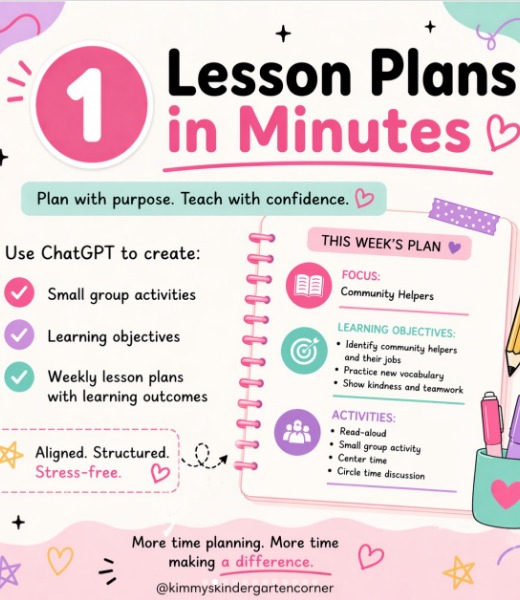
Use ChatGPT to create small group activities, learning objectives and weekly lesson plans with learning outcomes. Here’s the example from my post, a weekly plan with a Community Helpers focus:
- Learning objectives: Identify community helpers and their jobs, practice new vocabulary, and show kindness and teamwork.
- Activities: Read-aloud, small group activity, center time, and circle time discussion.
Try this prompt: “Create a 5-day Community Helpers lesson plan for preschoolers ages 3-5. Include learning objectives (identify community helpers and their jobs, practice new vocabulary, show kindness and teamwork) and a read-aloud, small group activity, center idea and circle time discussion for each day.”
Then make it yours. Swap in books you own, adjust for your schedule, and check it against your standards. Aligned. Structured. Stress-free. More time planning purposefully means more time making a difference.
2. Create Center Activity Ideas
Stuck on centers? Get instant ideas!
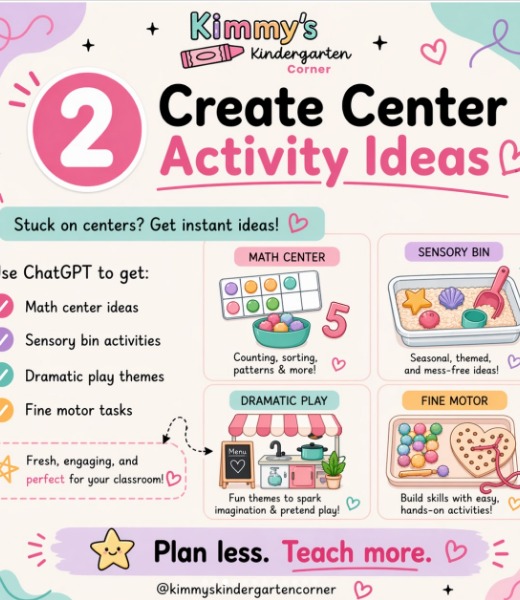
Use ChatGPT to get fresh ideas for four favorite center types:
- Math center ideas: counting, sorting, patterns and more.
- Sensory bin activities: seasonal, themed and mess-free ideas.
- Dramatic play themes: fun themes to spark imagination and pretend play.
- Fine motor tasks: build skills with easy, hands-on activities.
Try this prompt: “Give me 3 math center ideas, 3 sensory bin ideas, 2 dramatic play themes and 3 fine motor tasks for a Community Helpers unit for 4-year-olds. Use common classroom materials and mark which ones are low prep.”
Ask follow-ups like “make the sensory bin safe for 3-year-olds” or “add a counting element to the dramatic play center.” Plan less. Teach more.
3. Classroom Scripts
Sometimes the hardest part of teaching is knowing exactly what to say in the moment. ChatGPT can help you write calm, consistent scripts you can practice ahead of time. My post covers four kinds:
Redirect behavior
“We clean up first, then you can choose the next center.” Simple first/then language tells children what to do instead of what not to do.
Encourage
Ask ChatGPT for specific, process-focused praise, like “You kept trying even when it was tricky!” instead of a generic “Good job.”
Guide conversations
“Tell me more about that.” “How did you figure that out?” “What do you think will happen next?” Open-ended questions like these build language and thinking skills during play.
Talk to parents
ChatGPT can help you plan a warm, clear way to share a concern or celebrate growth with a family.
Try this prompt: “Write 5 short, positive redirection scripts for preschoolers using first/then language, and 5 open-ended questions to extend block play.”
4. Writing Prompts
Early writers need prompts that spark imagination and let them draw, dictate, or write a few words. Here are the examples from my post:
- “Draw your dream playground!”
- “One day, I found a door that led to…”
- Use the word “adventure” in a sentence.
- “If I could be anything, I would be a…”
For 3- and 4-year-olds, let them draw and tell you about it while you write their words. Kindergarteners can copy a sentence starter and finish it with inventive spelling.
Try this prompt: “Give me 10 drawing and writing prompts for pre-K about community helpers. Make each one a sentence starter a 4-year-old can finish by drawing.”
5. Circle Time Ideas
Circle time is the heart of the day, and ChatGPT can help you plan discussion questions that get every child talking. My example uses a Community Helpers theme:
- Who helps us at school?
- What does a firefighter do?
- How can we help others?
Ask for a full circle time flow: a greeting song, a short read-aloud, two or three discussion questions, a movement game, and a calm closing.
Try this prompt: “Plan a 15-minute Community Helpers circle time for preschoolers with a greeting, the questions ‘Who helps us at school?’, ‘What does a firefighter do?’ and ‘How can we help others?’, a movement game and a closing song.”
6. Differentiate with Ease
Every class has children at different levels. ChatGPT can take one activity and give you three versions in seconds. The example from my post:
- Beginner: match colors.
- Middle: sort and count.
- Advanced: create patterns.
The same materials (like colorful counting bears or pom-poms) can work for all three levels, so every child is at the same table, working on the right skill.
Try this prompt: “Take this activity, sorting colored pom-poms, and give me a beginner, middle and advanced version for preschoolers, using the same materials.”
7. Behavior Support
ChatGPT can help you swap reactive words for calm, connected language. My post shows a before-and-after:
- “Let’s take a breath together. Then we’ll try again.”
- “I see you’re upset. I’m here to help.”
The big idea: connection first, correction second. When children feel safe and understood, they’re ready to listen and learn the expectation.
Try this prompt: “A preschooler cries and throws blocks when it’s time to clean up. Give me 5 connection-first phrases and 3 positive strategies to prevent it next time.”
Describe the behavior, never the child. Don’t enter names or private information, and always use your own judgment and your program’s guidance.
8. Last-Minute Activities
The schedule changes, a special visitor is late, or you have five extra minutes before pickup. ChatGPT can give you quick, no-prep ideas on the spot. From my post:
- 5-minute counting game
- Color scavenger hunt
- Build a tower challenge
- Draw your favorite animal
Try this prompt: “Give me 10 no-prep, 5-minute activities for preschoolers that I can do with no materials or only blocks and paper.”
Save your favorites in a note on your phone so they’re ready when you need them.
9. Differentiate Instruction
Differentiation works for literacy too. The example in my post uses the Letter A:
- Trace: children trace uppercase and lowercase A.
- Identify: find the A words, Apple, Alligator and Astronaut.
- Write: write the sentence “A is for apple.”
Some children will be tracing while others are writing a full sentence, and everyone is learning the same letter.
Try this prompt: “Create a 3-level letter B activity for preschool and kindergarten: trace, identify beginning-sound words with picture ideas, and write a simple sentence.”
10. Save This for Later
The last slide is all about you! 💛 Save the post so you always have ideas ready, follow @kimmyskindercorner for more preschool classroom tips, and share it with a teacher friend who needs a little less stress.
And if you’d rather skip the planning altogether, ready-to-use activities are waiting for you in my shop: circle time sets, tracing pages and more, all made for little learners.
Also find me on TPT.
How to Get Better Answers from ChatGPT
If your first answer feels generic, don’t give up. The magic is in the follow-up. Here’s a simple formula: Who + What + Skill + Limits + Format.
- Who: “I teach 14 preschoolers ages 3-4 with one assistant.”
- What: “Plan a small group activity.”
- Skill: “Counting objects to 5.”
- Limits: “10 minutes, at a table, using counting bears and paper plates.”
- Format: “Give it to me as step-by-step directions with a beginner and advanced option.”
Then keep the conversation going. Ask “Make it simpler,” “Add a movement break,” “Give me three more ideas,” or “Turn this into a checklist I can print.” Each follow-up gets you closer to something that fits your classroom.
Putting It Together: A Community Helpers Week
Here’s how several of these ideas work together using the Community Helpers example from my post:
- Monday: Start your lesson plan (Way 1) with a read-aloud and the circle time question “Who helps us at school?” (Way 5).
- Tuesday: Open a community helpers dramatic play center and a counting math center (Way 2).
- Wednesday: Ask “What does a firefighter do?” and offer the writing prompt “If I could be anything, I would be a…” (Way 4).
- Thursday: Run a differentiated small group with matching, sorting and counting, and pattern levels (Way 6).
- Friday: Close the week with “How can we help others?” and a kindness and teamwork activity.
Keep your classroom scripts (Way 3) and behavior support phrases (Way 7) handy all week, and pull out a last-minute activity (Way 8) whenever you need one.
Smart Guardrails for Using ChatGPT in Early Childhood
- Protect privacy. Never enter children’s names, photos, diagnoses or family details. Follow your school’s technology policy.
- Check everything. AI can sound confident and still be wrong. Review ideas for safety (small parts, allergies) and developmental fit.
- Keep your voice. Edit scripts and parent messages so they sound like you.
- Keep it hands-on. AI helps you plan, while children learn through play, real materials and relationships.
A One-Hour Planning Routine
- Minutes 0-15: Generate and edit your weekly lesson plan (Way 1).
- Minutes 15-25: Brainstorm centers (Way 2).
- Minutes 25-35: Plan circle time questions and writing prompts (Ways 4 and 5).
- Minutes 35-45: Create differentiated versions of your key activities (Ways 6 and 9).
- Minutes 45-60: Write scripts and a list of last-minute activities (Ways 3, 7 and 8).
Frequently Asked Questions
Is ChatGPT free for teachers?
There is a free version, and paid plans exist too. Check OpenAI’s site for current options.
Can ChatGPT replace my curriculum?
No. It’s a brainstorming and drafting helper. Your curriculum, standards and knowledge of your children guide every decision.
Should children use ChatGPT?
Young children shouldn’t use it directly. It’s a planning tool for teachers.
Join Clubhouse VIP
Want ready-to-use resources all year long? Join Clubhouse VIP, my teacher membership, for members-only printables and circle time resources made for little learners.
Pin This for Later